Central management of the operation

Run your operation from a single Administrative Panel

IDBCONNECT centralizes customers, orders, products, inventory, prices, promotions, finance, franchises, permissions and reports in a management experience configured for each operation.

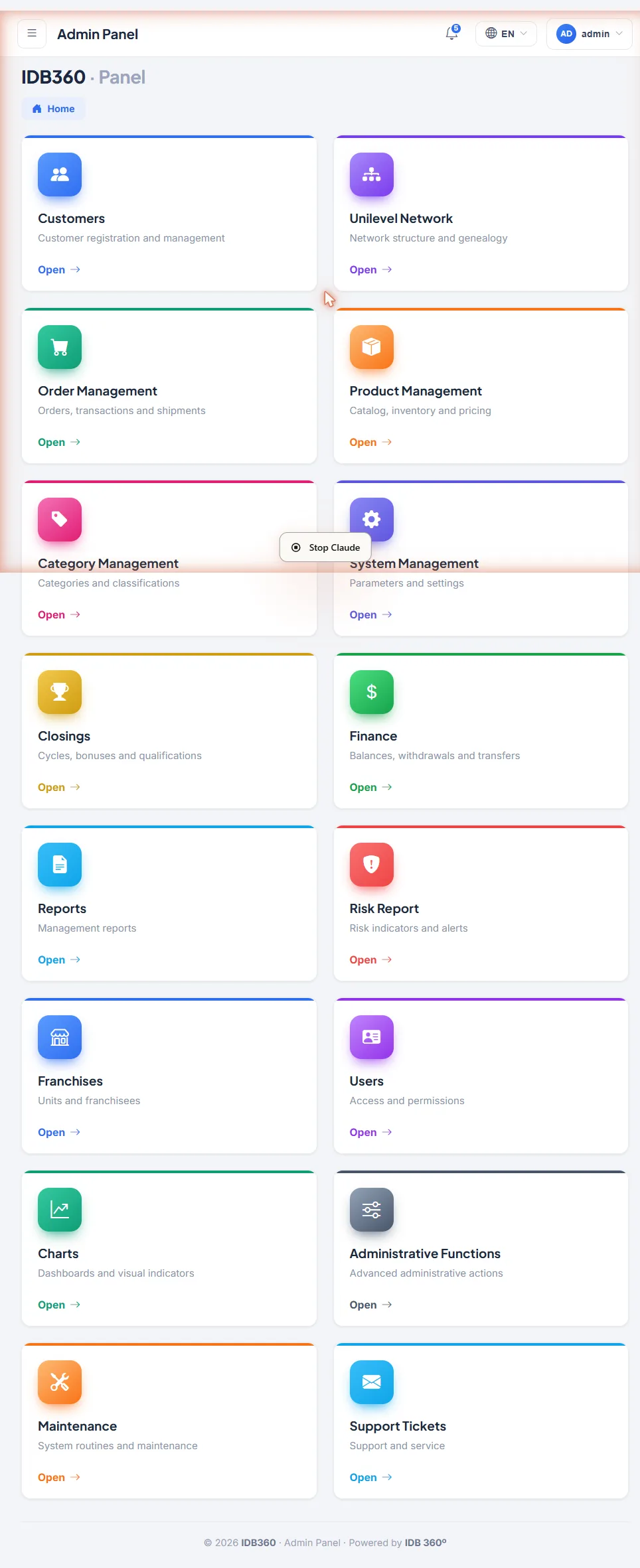
IDB360 Administrative Panel home with indicators, charts and operational modules
Centralized operationCustomers, orders and finance
Permissions and traceabilityProfiles, access and history
The Administrative Panel in action

Visibility and control to run the operation every day

From customer management to financial tracking, the Administrative Panel brings together the resources needed to monitor activities, execute processes, adjust settings and maintain the traceability of operational decisions.

Customers and documentsRegistrations, profiles, status and history of the operation's customers.
Orders and commercial operationListing, filters, status, tracking and follow-up of orders.
Products, inventory and pricesCatalog, categories, inventory by unit and prices by profile.
IDBCONNECT Administrative Panel with the Customers, Network, Orders, Products, Categories, Finance, Closings, Reports, Franchises and Users modules
Finance and transactionsBalance, statements, entries and authorized requests.
Franchises and POSUnits, inventory by franchise, POS and records by area.
Users, permissions and auditingAccess profiles, permissions and change history.
Operational logic

Monitor, configure, execute and audit

The Administrative Panel organizes the operation into four continuous movements — from daily monitoring to the auditing of decisions — so that each team acts with clarity within its scope.

1Monitor

Monitor

View customers, orders, inventory, transactions, requests and the results of the operation.

2Configure

Configure

Define products, prices, points, promotions, languages, content, access and the parameters available for each project.

3Execute

Execute

Make authorized adjustments, approve requests, update information and carry out administrative processes.

4Audit

Audit

Review histories, responsible users, dates, times and the justifications related to the changes recorded.

Management by area

The depth of the operation organized in a single environment

Explore how administrative teams monitor, configure and run different areas of the operation from the Administrative Panel.

01 · Customers

Customers and registrations

The administrative team monitors and manages the operation's customer registrations, with filters, documents, status and authorized actions.

  • Administrative filters by country, profile, qualification and graduation
  • Sponsor, documents and registration status
  • Authorized administrative actions on the registration
  • Export of the listing
IDB360 Administrative Panel with customer filters and listing
02 · Orders

Orders and commercial operation

The entire commercial operation monitored in an administrative listing, with multiple filters and access to the detail of each order.

  • Multiple filters: country, date, status, product, franchise and gateway
  • Payment and shipping methods, amounts and points
  • Access to the detail of each order
  • Printing and export of the commercial operation
IDB360 Administrative Panel with order filters and listing
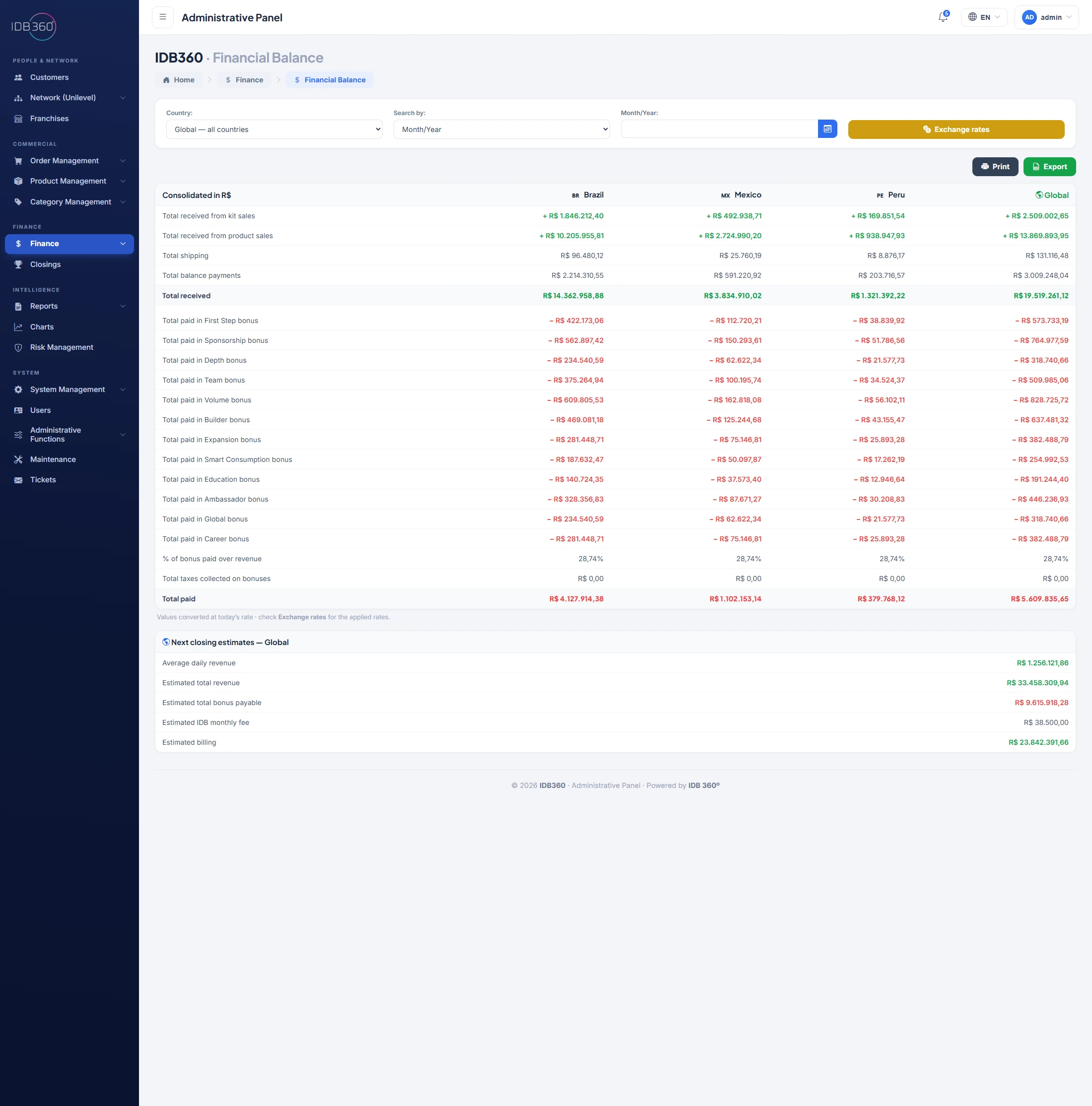
03 · Finance

Finance and closing

The consolidated balance of the operation organized by country, with the bases that support the reading of the closing.

  • Consolidated balance by country: revenues, shipping and balance
  • Bonuses, taxes and exchange rates
  • Closing estimates, subject to reconciliation
  • Printing and export

Illustrative values · estimates subject to reconciliation, according to the closing rules and the providers and integrations defined for the operation.

IDB360 Administrative Panel with consolidated financial balance by country
04 · Franchises

Franchises and distributed operation

Units and franchises registered and monitored centrally, with filters by country, type, owner and status.

  • Units and franchises by country, type and owner
  • Status and operation by unit
  • Product pickup and follow-up
  • Registration and filters for franchises
IDB360 Administrative Panel with filters and listing of franchises and units
Operational governance

Every action within the context, permission and history of the operation

The Administrative Panel makes it possible to organize responsibilities, restrict access and track relevant changes so that each team acts within its scope.

IDB360 Administrative Panel with filters and listing of administrative users
Administrative users
Registration and listing of the users who operate the Panel.
Access types
Different levels according to each user's responsibility.
Links to franchises or units
Association of users with the corresponding units or franchises.
Status and operational scope
The user's situation and the scope in which they can act.
Panel capabilities
Administrative profiles Permissions by responsibility Authorized actions Reviewable histories Justifications when required Records by user, date and time
Distributed operation

A management model ready for different units, regions and operating models

The company centralizes governance without losing the ability to organize the particularities of units, profiles, markets and channels.

Operational structure
HeadquartersFranchisesDistribution centersUnitsPOS
Configuration by context
Countries and regionsAdministrative profilesPrices and pointsLanguages and currenciesChannels and pickup
Monitoring
Status by unitOwnersAvailability for pickupAdministrative filtersExports and reports
IDB360 Administrative Panel with filters and listing of the franchises and units of the distributed operation
Operational breadth

Everything the operation needs, organized in a single Panel

The Administrative Panel brings together modules, pages and controls to monitor, configure and run the entire operation from a centralized structure.

Home

  • Administrative dashboard
  • Pending items
  • Operational indicators
  • Network and qualifications
  • Sales and orders
  • Closing
  • Risks
  • Module shortcuts

People & Network

Customers

  • Listing
  • Complete registration
  • Controlled access to the Virtual Office
  • Upline
  • Identification documents and status
  • Administrative editing

Network

  • Network lookup by login
  • Structure and upline

Franchises and units

  • Registration of franchises and units
  • Counter sales
  • Product pickup
  • Owners and status
  • Operation by unit

Finance

  • Financial balance
  • Monthly bonuses
  • Exchange rates
  • Customer statement
  • Franchise or unit statement
  • Cash flow
  • Authorized credits and debits
  • Import of credits and debits
  • Future entries
  • Tax notes and documents
  • Financial records
  • Financial records of franchises or units
  • Withdrawal requests
  • Transfers
  • Validation of identification documents
  • Sales by area
  • Sales by state, province or region
  • Sales by gateway
  • Closings and estimates

Commercial

Order management

  • Orders
  • Order detail
  • Authorized product change
  • Tracking code
  • Cancellation
  • Shipping subsidies
  • Vouchers
  • Coupons

Product management

  • Products
  • Inventory history
  • Price history
  • Product editing
  • Landing pages
  • Variants
  • Inventory by franchise or unit
  • Promotions
  • Price updates
  • Point updates
  • Bulk import and update

Category management

  • Categories and subcategories
  • File categories
  • Event categories
  • Display in the store and Virtual Office

Intelligence

Reports

  • Administrative and operational reports
  • Combinable filters
  • Comparison by period, country, region, unit, channel and status
  • Printing
  • Export

Charts

  • Financial variations
  • Registration variations
  • Quarterly, half-yearly and annual periods

Risk management

  • Indicators and alerts for operational monitoring

System

System management

  • Files
  • Banks
  • Banners
  • Company information
  • Testimonials
  • Events
  • Gateways
  • Languages
  • Machines
  • News
  • Store home
  • Virtual Office home sections
  • Carriers

Administrative functions

  • Change order consultant
  • Change payment method
  • Change login
  • Change sponsor
  • Change profile
  • Change order period
  • Change order status
  • Activate consultant
  • Block identification document
  • Cancel consultant
  • Reverse withdrawal
  • Remove financial password

Users

  • Administrative users
  • Access types
  • Franchise or unit managers
  • Specific permissions
  • Links to units

Tickets

  • View
  • Send message
  • Send file
  • Change status

Cross-cutting capabilities

  • History and traceability
  • Combinable filters
  • Printing and export
  • Profiles and permissions
  • Multi-country, multi-language and multi-unit operation
  • Settings according to the project

Centralize the management of your operation in a complete Administrative Panel

Track customers, orders, products, finance, franchises, permissions and reports in a management experience integrated with the capabilities of IDBCONNECT.